
This article draws on Creative Navy's project work in industrial and embedded interface design, spanning industrial robots, plant floor equipment across food, pharmaceutical, chemical, and materials manufacturing, industrial automation and control software, CAD/CAM systems, IoT platforms, and simulation software. Our work in this sector covers control room environments, plant floor operations, clean room manufacturing, and field deployment conditions: designing for process engineers, plant operators, maintenance technicians, and automation engineers. We work within the standards frameworks that govern these environments, including ISA-101 for HMI design, ISO 13849 and IEC 62061 for machinery safety, and IEC 61508 functional safety requirements, treating these as structural inputs to the design process rather than compliance checklists.
Most stakeholder briefs carry a hidden assumption: more options equals better design. It is a reasonable belief. Clients have watched colleagues struggle with rigid tools, complained about systems too slow to accommodate edge cases, and built workarounds for workflows the software never anticipated. The default request is flexibility. As much of it as possible.
A recent project for an aircraft engine manufacturer tested that assumption directly. The client needed a web platform for industrial project management, tracking work from pre-planning through delivery and post-delivery documentation. Projects contained work packages, which contained tasks, which contained subtasks. The brief for the item creation flow was precise: one button, immediate creation, no navigation required.
What came back, four iterations later, was something narrower, more constrained, and more deliberately protective than the original brief asked for. Not through resistance, but through evidence gathered at each stage.
Key figures
- 23%: share of unplanned downtime incidents in manufacturing caused by human error (Siemens, 2024)
- $1.4 trillion: estimated annual cost of downtime to the world's 500 largest companies (Siemens, 2024)
- $2.3 million: cost of one hour of automotive sector downtime (NIST)
- 75%: share of civil and military aviation accidents attributed to human error at some level of production and operations (FAA Human Factors Team)
- Logarithmic: the relationship between number of options and decision time, per Hick's Law (Hick & Hyman, 1952)
The commercial case for investing in interface quality in industrial software is documented in the analysis of embedded GUI design ROI across industrial and medical device contexts. The software that organises industrial work is not neutral. Whether it protects against planning errors or quietly enables them depends on decisions made early in the design process, long before the platform reaches the people who use it.
The Project: One Button, Four Iterations
The tree structure had four levels: projects, work packages, tasks, and subtasks. The client's brief called for a single Add button that would let users create any item type without navigating away from the current view.
The architecture was clear. The workflow was assumed. Neither of those assumptions held.
Iteration 1: Two Steps, Two Problems
The first iteration followed the client's instinct. A primary Add dropdown revealed the available item types. Selecting one navigated into a second view, where users chose the parent container for the new item.

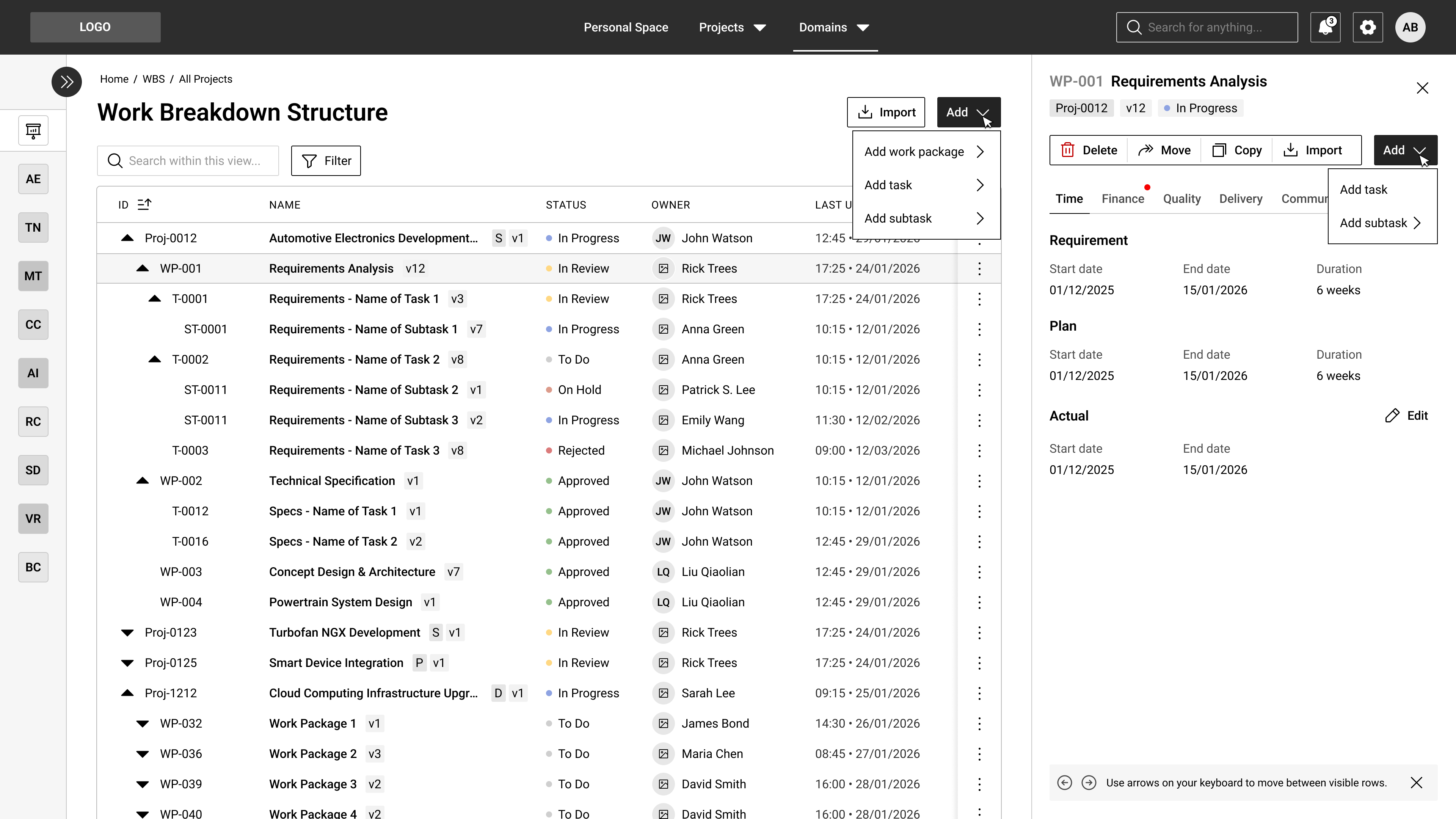
a primary “Add” drop-down menu that reveals the item types that can be created in this system.
The logic was defensible on paper: decide what to create, then specify where it belongs. The structural problem worsened with scale. A user managing dozens of projects, creating a subtask at the lowest level, would navigate three levels of hierarchy across two separate views. Each step added cognitive demand at exactly the moment when spare capacity was lowest.

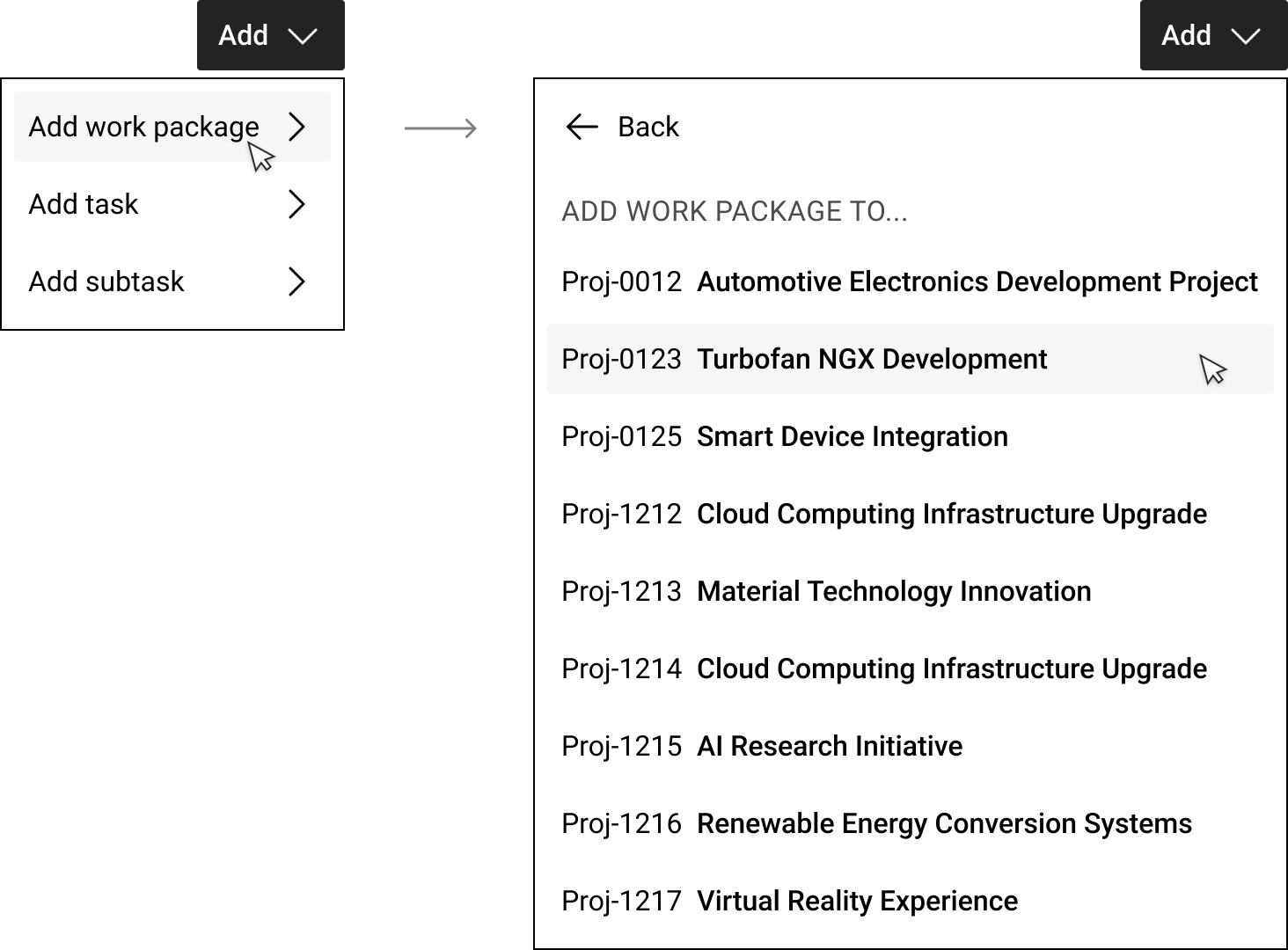
Selecting an item type navigated into a second drop-down view, where the user needed to select the “parent” item (the container of the new item)
Hick's Law, established by psychologists William Hick and Ray Hyman in 1952, states that decision time increases logarithmically with the number of options presented. In a high-information environment like industrial project management, where users are already tracking complex nested structures across multiple projects, every additional choice compounds the load. The two-step flow added choices without adding value.
Iteration 2: One Dropdown, One List
The two-step model collapsed into a single dropdown with expandable sections. Selecting "Add task" immediately showed the work packages available as containers, each labelled with its breadcrumb path. A search field at the top of the dropdown allowed users who knew their container's name to bypass the list entirely.

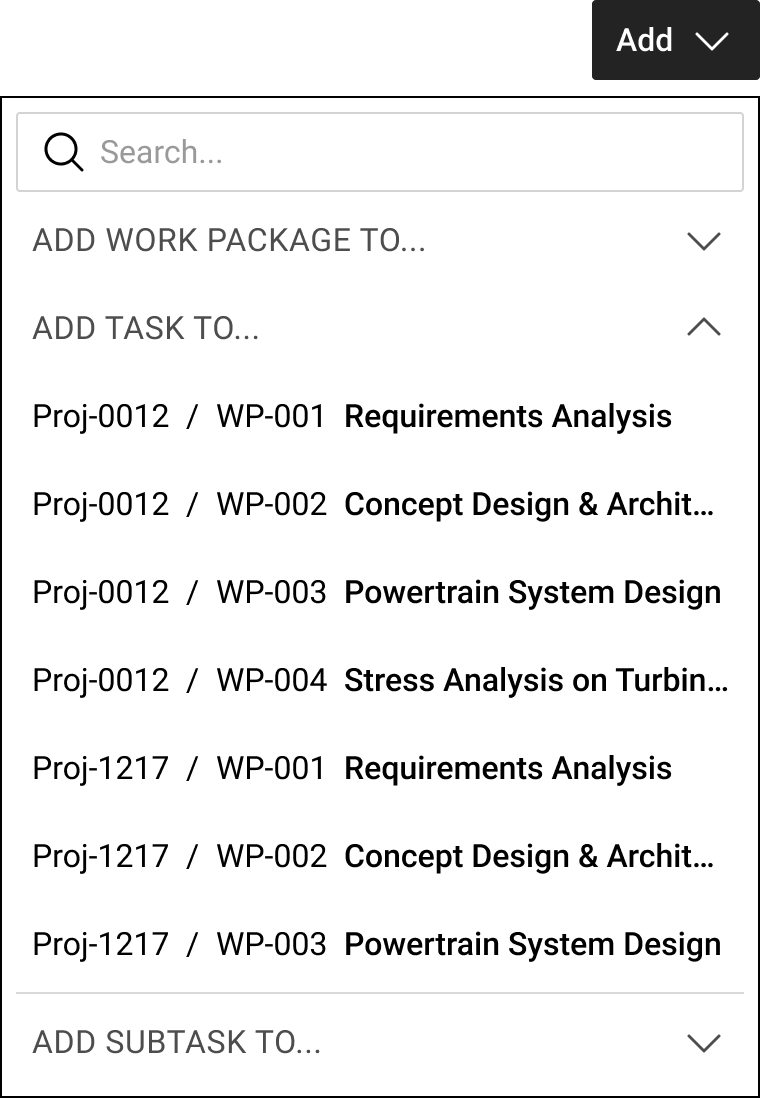
A top search field would enable people to quickly find their container, if they knew its name.
The solution served two distinct user types: those who navigate by name, and those who navigate by scanning. It reduced the interaction from two discrete steps to one continuous gesture.
Research on cognitive load theory is relevant here. Sweller (1988) showed that elevated mental load preferentially impairs analytical reasoning, increasing reliance on faster but more error-prone shortcuts. Individuals under high cognitive load are more likely to make impulsive choices and less capable of the multi-step reasoning that industrial project planning requires. Every reduction in unnecessary decision-making preserves cognitive capacity for the actual work. This is not a theoretical claim: software that amplifies cognitive load under operational pressure, rather than reducing it, produces measurable usability failures in enterprise contexts.
The flexibility-usability tradeoff holds that as a system's flexibility increases, its usability decreases. In industrial project management software, each additional creation option is one more decision made under cognitive load. Collapsing the two-step creation flow into a single expandable dropdown reduced choices without removing capability, preserving the cognitive resources users need for the work itself.
Iteration 3: Creation in Context
Later in the project, the client team requested a second entry point: a creation button directly on each row of the tree structure. The rationale was familiar. Maximum flexibility, minimum navigation. A sticky '+' icon was added on hover to the right side of every row.

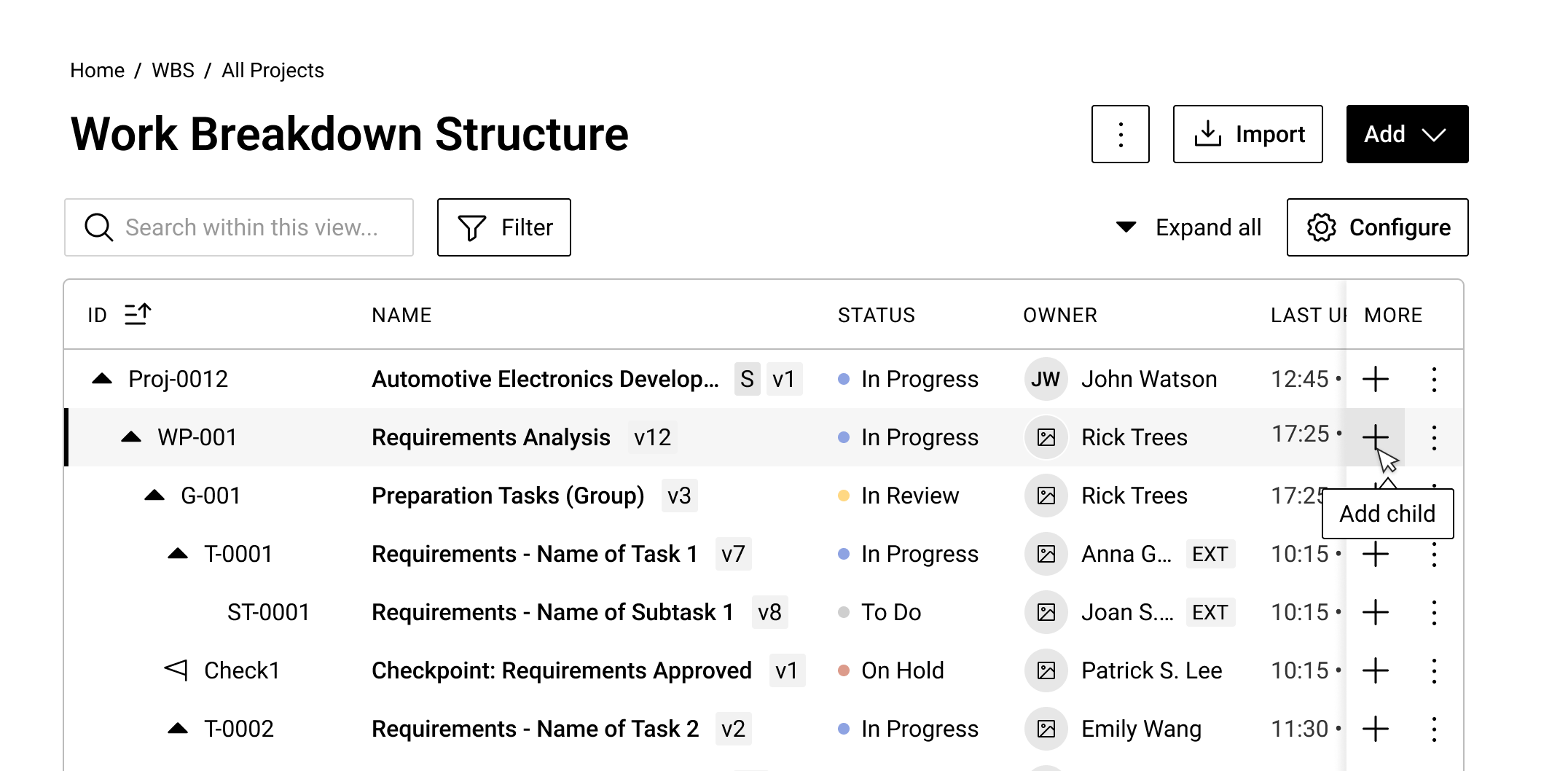
sticky “Plus” icon button on the right-hand side of the table view.
This solved a genuine problem. When a user is already oriented within a specific branch of the tree, sending them back to the global Add menu and requiring re-navigation to the same location is unnecessary friction. The inline button respected where the user's attention already was.
At this stage the design had two coherent paths: global creation for users working across projects, and local creation for users already oriented in the tree. Both worked. Neither created confusion. The design was stronger for having both rather than forcing all users into one flow.
In projects where we have worked on multi-level tree structures for industrial and technical software, the most consistent finding is that users do not start from the same position in the hierarchy. Global and local creation modes serve different moments in the same workflow. Removing one in the name of simplicity tends to send a user group toward workarounds, which reintroduces exactly the friction the simplification was meant to resolve.
Iteration 4: Design for Batch Work
The most consequential insight of the project came from a direct question about the most common creation scenario.
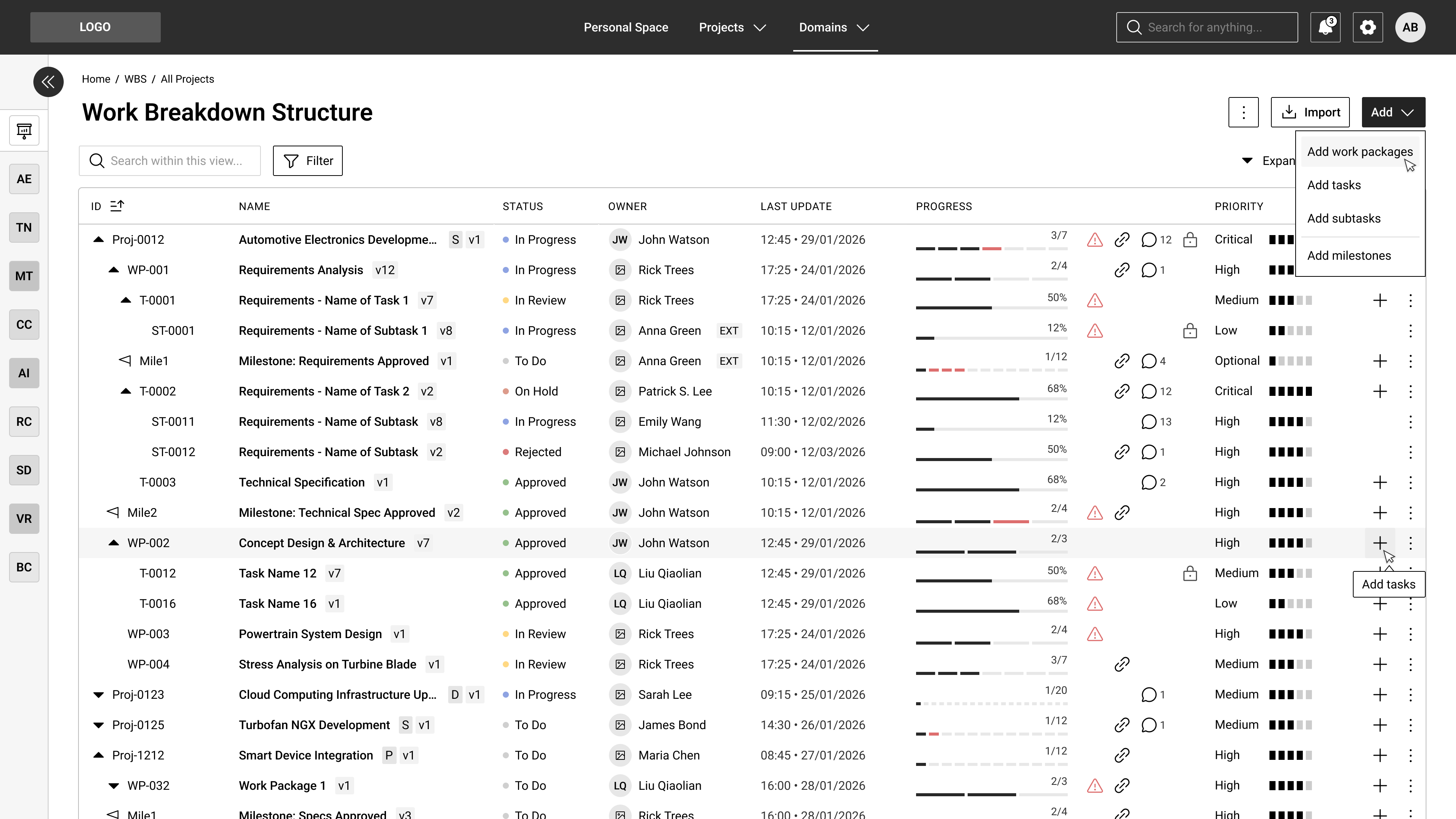
The assumption had been that users create items one at a time, completing each with full detail before moving to the next. The reality was different. In many cases, users needed to create 10 to 20 containers rapidly: placeholder work packages or tasks with minimal information, to be completed by other team members later. The pattern is common in industrial project planning. Structure comes first. Detail comes later.
UX iteration 4
The existing flow was optimised for depth. The actual workflow demanded breadth.
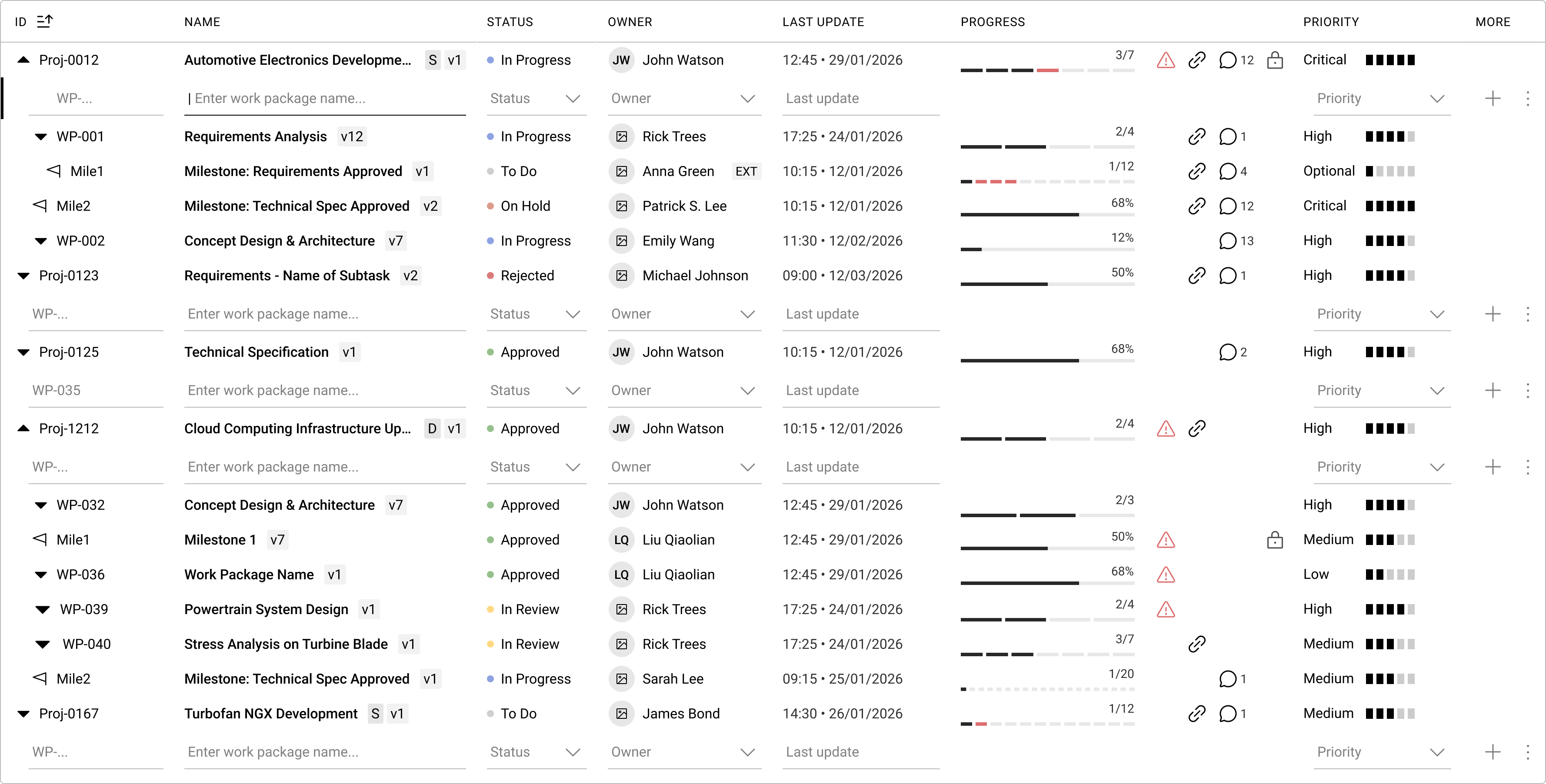
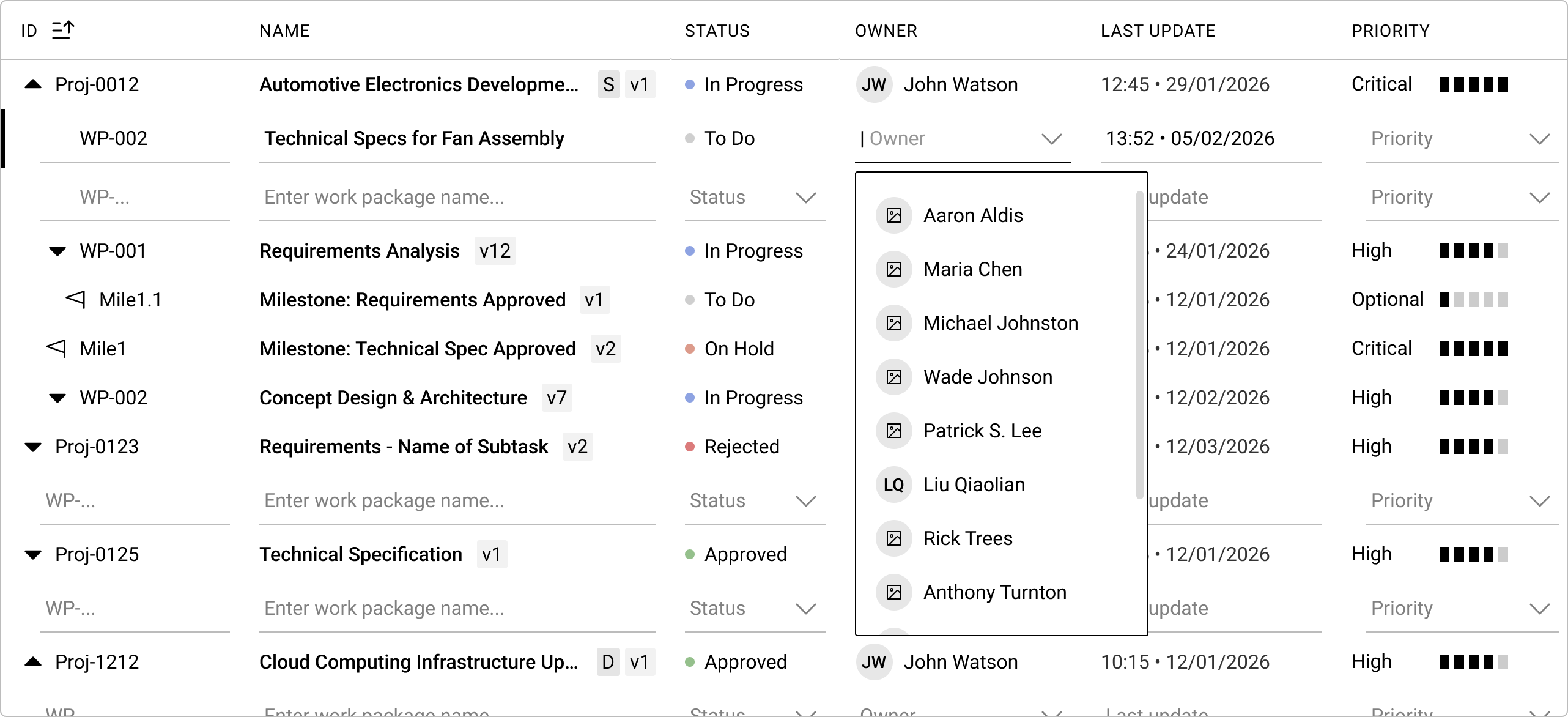
The redesign made batch creation the explicit primary mode. Add dropdown buttons were rewritten in the plural: "Add work packages," "Add tasks." Selecting one transformed the tree view. Every applicable container revealed an empty input row immediately below it, with cursor focus placed in the name field of the topmost row. The user could begin typing immediately, with no further action required.

UX iteration 4

UX iteration 4
As each row was completed and the user moved forward, a fresh empty row appeared below it automatically. The interaction borrowed from spreadsheet behaviour: familiar, fast, and low-friction for repetitive entry.
The Bulk Edit Safeguard
Spreadsheet-style auto-save is the convention in table applications. Auto-save was wrong here.
This platform was built for industrial projects in the aviation sector. A mistakenly committed work package does not simply sit in a backlog. It can trigger downstream scheduling, resource allocation, and compliance documentation processes. The cost of an accidental commit is not a delete and an undo. It is a cascade.
The decision was to introduce an explicit save/discard state whenever batch creation was active. The standard toolbar was replaced by two buttons: "Save New Items" and "Discard New Items." Every item created during the batch session required a deliberate final action before it was committed to the system. If a user was interrupted mid-session, they could discard all draft rows cleanly and restart when ready.
In safety-critical industrial software, explicit save states during batch creation prevent uncommitted items from triggering downstream processes. When a mistakenly committed work package in an aviation supply chain can initiate scheduling, resource allocation, and compliance procedures, the auto-save convention becomes a liability. Replacing the standard toolbar with explicit Save and Discard actions ensures every new item is committed by choice rather than by default.
The Flexibility-Usability Tradeoff
The principle has a formal name in design literature. As the flexibility of a system increases, its usability decreases. Accommodating more options requires satisfying a larger set of design requirements. More requirements produce more complexity. In consumer software, that complexity is a friction problem. In industrial software serving a supply chain for aircraft engine manufacturing, it is a measurable risk factor.
Complexity accumulates. In software products that have grown through multiple feature generations, the point at which accumulated design complexity exceeds the cost of renewal can be identified from usability metrics and error data long before it becomes a crisis. In the aviation supply chain context, that identification should not wait.
In aviation, approximately 75% of civil and military accidents have been attributed to human error at some level of the production and operations chain (FAA Human Factors Team, 1996). The FAA has identified poor human-machine interface design as a contributing factor. Systems should not be perceived as unnecessarily complex by the people who use them.
The platform described here is not flight-deck software. Errors in a project management tool do not cause accidents directly. They create conditions for them: misconfigured work packages, incomplete task records, missing accountability assignments. In a supply chain feeding aircraft engine production, upstream planning errors propagate.
The lesson from four iterations is not that flexibility is always wrong. Flexibility has a cost: cognitive load, error probability, the friction of recovering from mistakes. That cost is not evenly distributed across industries. When the consequences of errors are serious, the designer's job is not to provide every option. It is to protect users from the ones they should not need.
More Options Is Not Better Design
The instinct to maximise flexibility is not irrational. It comes from genuine observation of rigid systems failing real users. What it misses is that flexible designs are more complex by definition, and complexity in high-stakes software is a measurable risk, not a design inconvenience.
Chernev et al. (2015) found in a meta-analysis of choice overload research that larger option sets consistently reduce decision quality and increase the likelihood of error, particularly in high-information environments. The effect is not hypothetical. It is repeatable and industrially relevant.
Designing constraints into the creation flow did not limit what users could do. The sibling creation capability remained available through the tree. The single-item modal remained available for users who needed full detail at the point of creation. What the constraints removed were decisions users had to make unnecessarily, at moments when cognitive load was already high.
Good constraints go unnoticed because the user never needed the option they were protected from taking.
Three Decisions Worth Noting
Sibling vs. child creation. A stakeholder requested the option to create either a sibling or a child from the inline '+' button. The request was declined. Presenting a binary choice at the moment a user is already processing a high-information view adds cognitive demand without adding capability. Child creation became the default. Sibling creation remained available through the tree. No capability was removed; one unnecessary decision was.
Modal vs. in-context creation. A modal was designed and tested. For single-item creation with full detail, it performed well. For batch creation, which turned out to be the dominant real-world pattern, the modal added switching friction and broke the spatial relationship between new items and their position in the tree. In-context creation won on the primary use case.
Custom terminology. The client proposed new names for additional hierarchy levels. This was advised against. When expert software uses standard vocabulary for shared concepts, it reduces the learning load for incoming users who need to map the tool to an existing mental model before they can work effectively. Products that invent terminology for standard concepts place a learning burden on every new user. Early adopters who cannot map an unfamiliar term to their existing mental model disengage. Standard vocabulary is not a lack of imagination. It is respect for the user's cognitive budget.
Limits and Gaps
The four-iteration process described here was conducted for a single client in a specific domain: industrial project management for an aircraft engine manufacturer. Several conditions shaped the conclusions in ways that may not generalise.
The batch creation insight came from a direct question about the most common creation scenarios. Without that conversation, the design would have remained optimised for the wrong workflow. Iteration 4 exists because a question was asked. In projects where that question is not asked, the gap between intended and actual workflow may not surface until after deployment.
The explicit save/discard safeguard was correct for this client. For industrial software in sectors where accidental commits carry lower downstream consequences, auto-save may be the right convention. The principle is not that explicit save states are always correct; it is that the save convention should be chosen based on the actual cost of an accidental commit, not borrowed by default from table application conventions.
The flexibility-usability tradeoff evidence cited here comes from controlled research environments and single-domain accident analyses. How the tradeoff behaves across different levels of user expertise, different tree structures, or significantly different industrial sectors has not been tested in this project. The principle is robust. The calibration is context-dependent.
One question this project does not fully resolve: how often industrial software teams have the conversation about primary creation patterns before design begins, rather than during iteration. The answer to that is probably less comfortable than the design conclusions.
Conclusion
A brief that asks for maximum flexibility is asking a real question. The question underneath it is: what are the consequences of the wrong choice, and who bears them?
For a stakeholder who has watched colleagues fail with a rigid tool, the answer points toward options. For a user managing 20 work packages in a live aviation supply chain under deadline pressure, it points toward clarity.
The four iterations of this project moved progressively toward clarity. Not because the client was wrong to want flexibility, but because the evidence at each stage showed where the cost of flexibility was being paid by the user rather than recovered by them.
Protecting users from unnecessary choices is not restrictive design. It is what the design is for.
FAQ
What is the flexibility-usability tradeoff in industrial software? The flexibility-usability tradeoff is a formally named principle in design literature: as system flexibility increases, usability decreases. More options require satisfying a larger set of design requirements, which produces complexity. In industrial software, that complexity translates directly into decisions made under cognitive load. In high-stakes environments, removing unnecessary choices preserves the cognitive capacity users need for the actual work.
How does Hick's Law apply to task creation flows? Hick's Law states that decision time increases logarithmically with the number of available options. A two-step creation flow that requires users to first select an item type and then navigate a parent container list imposes sequential decisions before any work is created. In a project management tree with multiple hierarchy levels, this compounds quickly. Collapsing those steps into one gesture reduces decision load without removing capability.
Why was batch creation the key design insight here? The original design assumed users create items one at a time with full detail. Direct questioning revealed that many users needed to create 10 to 20 placeholder containers rapidly, with detail filled in later by other team members. The flow was optimised for depth; the real workflow demanded breadth. Reframing the Add button in plural form and enabling inline batch input resolved the mismatch.
When should industrial software use explicit save states instead of auto-save? When accidental commits trigger downstream processes. A mistakenly committed work package in an aviation project management system can initiate scheduling, resource allocation, and compliance documentation that takes effort to reverse. Auto-save is appropriate where undoing a commit costs only a delete. Where it costs a cascade of downstream actions, an explicit Save/Discard state is the correct default.
What did the sibling vs. child creation decision reveal? The request to add sibling creation to the inline '+' button was declined because it introduced a binary choice at a moment when users were already processing a high-information view. Defaulting to child creation removed a decision without removing the capability; sibling creation remained available through the tree. The decision illustrates the principle: remove unnecessary choices at high-load moments, not capability.
Why is custom terminology a usability risk in industrial software? When a product invents names for standard concepts, users who cannot map new terminology to existing mental models do not explore further. In enterprise software where onboarding time is constrained and new users arrive continuously, unfamiliar terminology compounds as a friction cost across the user population. Standard vocabulary is not a failure of originality. It is recognition that cognitive budget spent on learning names cannot be spent on doing work.
References
Chernev, A., Böckenholt, U., & Goodman, J. (2015). Choice overload: A conceptual review and meta-analysis. Journal of Consumer Psychology, 25(2), 333-358. https://doi.org/10.1016/j.jcps.2014.08.002
FAA Human Factors Team. (1996). The interfaces between flightcrews and modern flight deck systems. Federal Aviation Administration. https://www.faa.gov/regulations_policies/handbooks_manuals/aviation/human_factors_design_standards
HFES. (2021). Human factors and the Boeing 737 MAX 8. Human Factors and Ergonomics Society. https://www.hfes.org
Hick, W. E. (1952). On the rate of gain of information. Quarterly Journal of Experimental Psychology, 4(1), 11-26. https://doi.org/10.1080/17470215208416600
Mahemoff, M., & Johnston, L. (1998). Principles for a usability-oriented pattern language. Proceedings of the Australasian Computer-Human Interaction Conference (pp. 132-139).
NIST. (2024). Manufacturing cost analysis. National Institute of Standards and Technology. https://www.nist.gov/el/intelligent-systems-division/manufacturing-systems-integration
Siemens. (2024). The true cost of downtime 2024. Siemens Digital Industries Software. https://www.siemens.com/global/en/products/automation/topic-areas/industrial-edge/true-cost-of-downtime.html
Sweller, J. (1988). Cognitive load during problem solving: Effects on learning. Cognitive Science, 12(2), 257-285. https://doi.org/10.1207/s15516709cog1202_4
In this story
This article traces a four-iteration design process for an industrial project management platform serving an aircraft engine manufacturer. It covers the flexibility-usability tradeoff in safety-critical software, batch creation workflow design, Hick's Law in industrial contexts, and the case for explicit save states when accidental commits trigger downstream processes.
- The Project: One Button, Four Iterations
- Iteration 1: Two Steps, Two Problems
- Iteration 2: One Dropdown, One List
- Iteration 3: Creation in Context
- Iteration 4: Design for Batch Work
- The Bulk Edit Safeguard
- The Flexibility-Usability Tradeoff
- More Options Is Not Better Design
- Three Decisions Worth Noting
- Limits and Gaps
- Conclusion
- References