
This article draws on Creative Navy's project work in complex technical and scientific software, spanning computational fluid dynamics, surgery planning systems, scientific research software, CAD/CAM platforms, circuit simulation, vessel tracking systems, air traffic control, and mission control environments. We have designed for demanding technical experts such as CFD analysts, circuit design engineers, surgeons, air traffic controllers, mission controllers, and maritime operators. A central competency in this work is the visualisation of complex, dynamic, multi-dimensional data under real operational conditions, where clarity and precision directly affect decision quality. Several of these environments are governed by specific human factors standards, including EUROCONTROL and ICAO guidelines for ATC, IEC 62366 for medical software, and NASA requirements for mission-critical systems.
Key Statistics
- 7.1 hours per week lost to CAD and PDM friction per engineer, as of 2023-24 (Onshape/Isurus survey, 1,400+ engineering and manufacturing professionals)
- 94% of executives wanted productivity improvement from engineering design teams (Lifecycle Insights CAD Usability Study, 2021)
- 6% executive satisfaction rate with engineering team productivity (Lifecycle Insights 2021)
- 74% of engineers wanted training on new CAD features but could not access budget or time to complete it (Lifecycle Insights 2021)
- 1 in 4 CAD users expected to change software systems within five years (Onshape/Isurus 2023-24)
An average of 7.1 hours per week. That is the time a 2023-24 survey of more than 1,400 engineering and manufacturing professionals found their teams losing to CAD and PDM friction: crashes, unrecoverable configuration states, delays waiting for installs and upgrades, and IT overhead that engineering time should not be carrying. Not time solving design problems. Time managing the tool.
The finding comes from research commissioned by Onshape, a cloud-native CAD vendor with a clear commercial interest in negative findings about competitors, and it should be read accordingly. The executive dissatisfaction data is independent: the 2021 Lifecycle Insights CAD Usability Study found that 94% of executives wanted productivity improvement from their design teams, while only 6% described themselves as satisfied with what those teams were delivering. Two surveys. Same gap.
This review covers what has materially changed in the CAD/CAM/3D modelling software landscape since Creative Navy's 2023 benchmarking of twelve products, where the evidence supports it. It evaluates FreeCAD, Autodesk Fusion (formerly Fusion 360), AutoCAD, SolidWorks, OnShape, and the new entrant Shapr3D. Six products from the original review had insufficient update evidence to assess in this cycle. The intended reader is a product director or senior PM who needs to understand where friction is structural, where it is being actively addressed, and where a competitive gap is opening between vendors willing to treat interface quality as operational infrastructure and those that are not.
What This Review Covers
Interface Integrity Score
Each product is evaluated against five dimensions that the practitioner evidence collected for this review addresses most consistently:
- Command discoverability: Can a user with reasonable domain knowledge find the right tool for a task without documentation?
- Interaction feedback: Does the interface confirm what the user is doing, and signal error states before work is lost?
- Structural coherence: Does the organisation of functionality map onto how design work actually happens, or onto how the software was engineered?
- Update stability: Do software updates preserve existing workflows, or introduce new friction and data loss?
- Scale performance: Does the interface hold up when project complexity increases to production-relevant levels?
These dimensions are not a comprehensive usability framework. They represent the categories where the cross-product evidence was most consistent and most consequential for product-level decisions.
FreeCAD 1.0: Structural Investment After 22 Years
FreeCAD 1.0, released on November 19, 2024, completed a UI overhaul that had been in development for years. The release introduced dark and light themes, an on-model task panel replacing floating dialogs, dock widget overlay capability, a rebuilt Preferences dialog with tree navigation, and a new TabBar workbench selector. Critically, it resolved the topological naming problem: a structural failure that caused models to break unpredictably when geometry was edited, which no amount of visual refinement could fix. An integrated Assembly Workbench, previously absent, became built-in rather than a plugin dependency.
A Design Working Group formed specifically to address UI issues produced a comprehensive icons cleanup alongside the structural changes.
The practitioner accounts collected before 1.0 describe what the release was responding to. A Capterra reviewer identified as a CAD technician described spending three days on a task that would take two minutes in competing software, citing unreliable snap and dimensioning tools. A Phoronix forum commenter with a decade of FreeCAD use wrote that the UI "absolutely suck[ed]" and that the workflows "made very little sense and took a large amount of effort." These are not cosmetic complaints. They describe an interaction model that required expert knowledge to work around and provided no path for self-correction.
What distinguishes FreeCAD 1.0 is that the response was structural: a dedicated working group, a resolved geometry-breaking bug, and a rebuilt navigation architecture. Not a reskin. This is what structural redesign of expert technical software typically requires when interface debt has accumulated across product generations: the cosmetic layer cannot be improved without first fixing what is underneath it.
Interface Integrity Score, FreeCAD 1.0 (post-release): Discoverability: improved. Feedback: improved. Structural coherence: improved. Update stability: insufficient post-1.0 data. Scale performance: unknown.
Autodesk Fusion: Cosmetics Without Structure
Autodesk rebranded Fusion 360 to "Autodesk Fusion" in 2023 and moved to monthly update cycles. A new UI theme system introduced Dark Blue and Classic modes in 2024, with Match OS (automatic light/dark following system settings) becoming the default as of November 2025. Incremental View Cube orbit improvements reduced disorientation during perspective changes. The stage-switching workflow (Design, Simulation, Manufacture, Drawing) remains the structural centrepiece, unchanged in concept from the 2023 review.
That structure is where the tension in the product becomes visible. A practitioner with SolidWorks, Inventor, and Pro/E backgrounds described switching to Fusion: prior domain expertise actively misfired because Fusion's command logic does not map onto mental models built in adjacent products. The interface provided no warnings, no hints, only passive buttons offering no feedback about what was expected. The account is not about the learning curve. It describes what happens when an experienced user cannot self-correct because the interface gives them nothing to correct from.
A separate account from 2024 describes design components disappearing after a routine software update, the second such occurrence for that user. Monthly update cycles produce cosmetic improvements; the structural command model has not been publicly addressed. The data loss account is not a friction-in-learning story. It is a trust failure that expertise cannot compensate for.
Interface Integrity Score, Autodesk Fusion: Discoverability: moderate. Feedback: low. Structural coherence: moderate. Update stability: poor. Scale performance: moderate.
AutoCAD 2026: Performance Gains, Structural Stasis
AutoCAD 2026 claimed file open speeds up to eleven times faster than its 2025 predecessor. AutoCAD 2024 introduced Smart Blocks, an AI-assisted placement and replacement workflow representing the most materially new interaction behaviour the product has offered in several release generations. Activity Insights for collaborative drawing tracking extended into 2025.

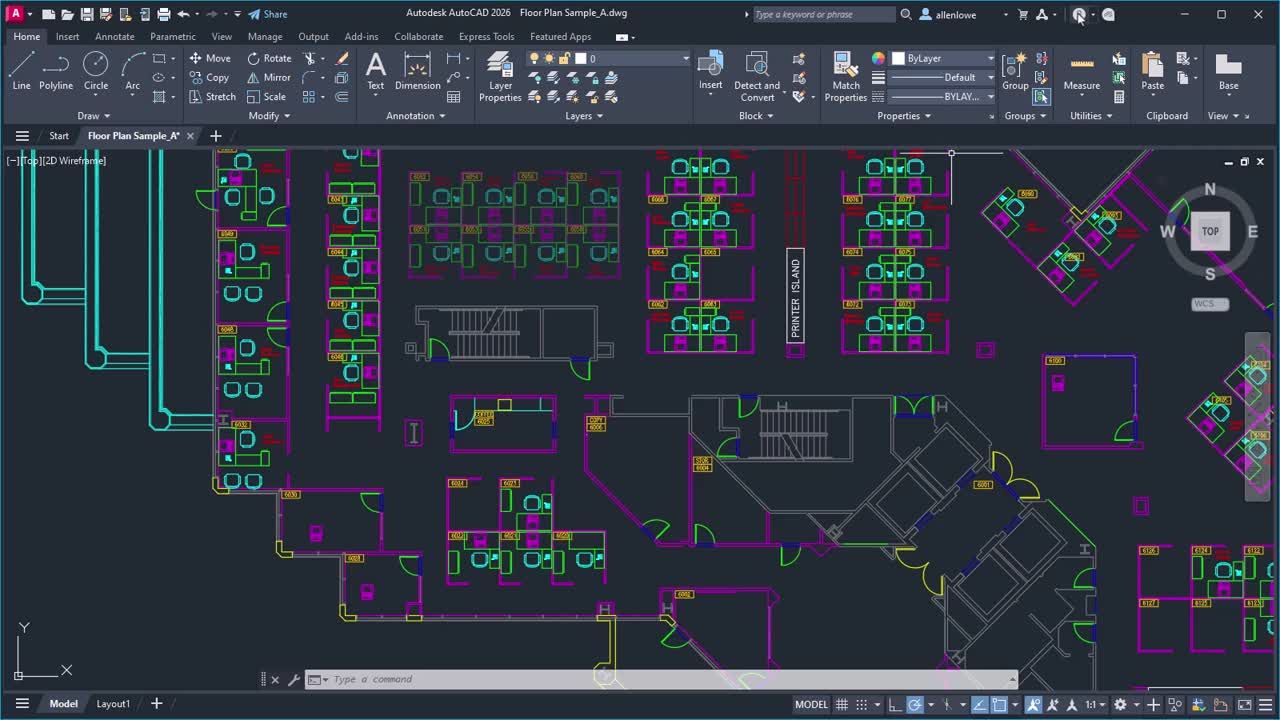
AutoCAD user interface design
The ribbon-and-command-line paradigm has not changed structurally. A persistent Autodesk Community forum thread documented AutoCAD 2024 running effectively unusably on high-specification hardware (Intel i9, 32GB RAM, RTX3070), with dialogs and property panels continuously redrawing. Resolution required running GRAPHICSCONFIG and resetting to defaults: a diagnostics step not surfaced in the interface, requiring knowledge the software itself does not provide. Multiple respondents confirmed the experience; the thread remained active through August 2025.
A separate persistent complaint in practitioner forums describes the undo command treating zoom actions and ESC key presses as equally "undoable" to design operations, corrupting the undo history and forcing users into compensatory routines. This is not a new observation. It describes the software's internal model treating all actions as equivalent when the user's model of the workflow does not. That structural mismatch has persisted through multiple release generations.
Interface Integrity Score, AutoCAD 2026: Discoverability: moderate. Feedback: low. Structural coherence: moderate. Update stability: moderate. Scale performance: improved.
SolidWorks: When Scale Triggers Failure
No evidence of structural interface redesign for SolidWorks was found in this research cycle. The feature manager design tree, ribbon menu, and property panel arrangement from the 2023 review remain the working model.
The practitioner evidence describes a specific failure class. A Capterra reviewer, a document control manager working in medical devices, described SolidWorks crashing when assembly drawings reached high component counts, causing delays in releasing drawings. A second reviewer in the same period described crashes due to file size causing loss of unsaved work. Both accounts describe the same pattern: the conditions under which the tool is most needed are the conditions that trigger instability.
This matters for product directors evaluating SolidWorks or standardising on it across teams: the failure mode is not a learning curve problem. It is a scale problem, activating at production-relevant complexity. The users most likely to encounter it are the most experienced, working on the most critical projects. When interface instability compounds at scale and remains unaddressed across product generations, the question eventually stops being about usability and becomes about when interface debt becomes a switching trigger, a calculation that is worth making before it is forced on the organisation.
Interface Integrity Score, SolidWorks: Discoverability: moderate. Feedback: moderate. Structural coherence: moderate. Update stability: poor. Scale performance: poor.
Shapr3D: A Different Structural Bet
Shapr3D was not in the 2023 review despite being an established product. Built on the Siemens Parasolid kernel, it was designed from the outset for touch input and single-window workflows, initially for iPad and Apple Pencil. Its absence from the earlier benchmarking was an omission worth correcting.

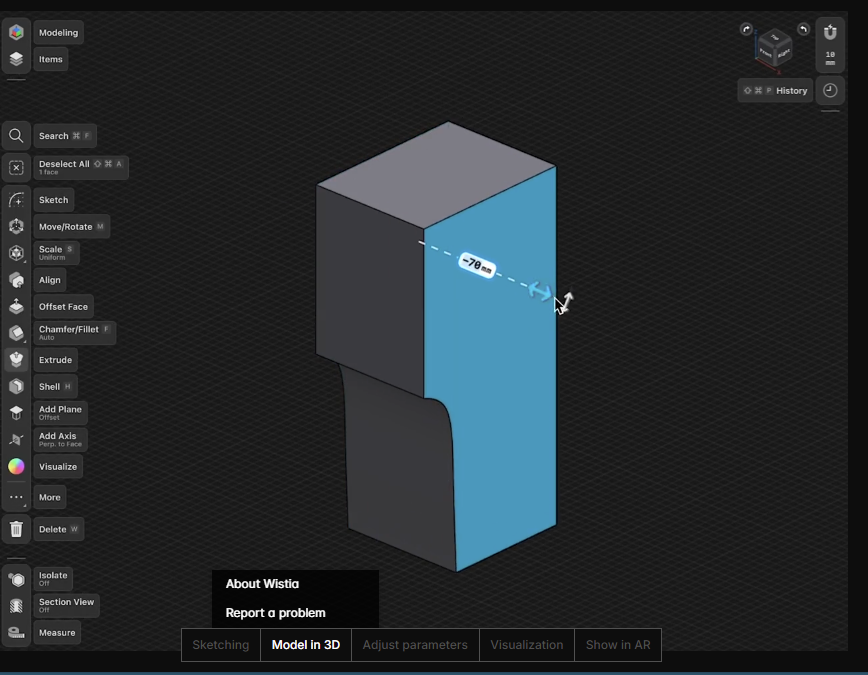
Shapr 3D user interface
Since 2023, History-Based Parametric Modeling moved from beta to full integration (April 2024), Apple Vision Pro support launched, and enterprise file format imports (JT, CATPART, PRT) were added. Shapr3D published a case study in 2024-25 claiming that a European OEM cut equipment design timelines by 50% after adoption, attributed to UX-driven uptake reducing reliance on presentation-based design reviews. The OEM is unnamed and the study is vendor-published; it should be read accordingly. Independent G2 reviews from 2025 describe the product as having "no legacy notion of how a 3D CAD should work."
That description is analytically useful. Shapr3D represents what constraint respecting produces when applied to interface design from first principles: a product built around the constraints of direct manipulation and single-context work, rather than retrofitting those constraints onto accumulated toolbar conventions. The result is structurally different, not just visually different. Whether it holds at the assembly complexity levels where SolidWorks and Fusion are most commonly deployed is the open question.
Interface Integrity Score, Shapr3D: Discoverability: high. Feedback: high. Structural coherence: high. Update stability: high. Scale performance: constrained at high assembly complexity (evidence insufficient).
Patterns Across the Landscape
Expert Users Don't Need Better Interfaces
The standard objection to the cost claims above is that experienced CAD users compensate effectively through keyboard shortcuts, macros, custom toolbars, and accumulated institutional knowledge. Interface quality is a novice problem; productive teams work around it.
The evidence does not support this. The Lifecycle Insights 2021 study found that 74% of engineers wanted training on new CAD features but could not access the time or budget to complete it. This is an expert population unable to realise the productivity gains from features they already have access to, because the learning burden each new release imposes exceeds available capacity. The cost of interface complexity scales with expertise: the more features a team relies on, the higher the per-generation maintenance cost of that expertise.
The account that makes this most concrete comes not from a novice but from a multi-decade CAD industry professional who described starting a simple bookcase project in software he described as "by all standards, dead easy to use," spending thirty minutes unable to enter a basic dimension despite documentation and YouTube, and ultimately closing the laptop to build from pencil sketches. The calculation was explicit: two to three days of learning time against the time saved by digital modelling, for a short-deadline task. Expert users make abandonment decisions. This one was made by someone who had been preaching the value of digital modelling for decades.
Across the twelve products covered in 2023, and the six with sufficient evidence to assess here, the pattern that consistently emerges in projects where we work on technically complex software interfaces is this: the friction that costs organisations most is not the friction that stops tasks from being completed. It is the friction that completes invisibly, absorbed into compensatory routines that practitioners treat as normal. Workarounds become workflows. The interface trains the team rather than the team training the interface.
The comparison table below reflects the Interface Integrity Score across products with sufficient evidence in this cycle.
| Product | Discoverability | Feedback | Structural Coherence | Update Stability | Scale Performance |
|---|---|---|---|---|---|
| FreeCAD 1.0 | Improved | Improved | Improved | Unknown | Unknown |
| Autodesk Fusion | Moderate | Low | Moderate | Poor | Moderate |
| AutoCAD 2026 | Moderate | Low | Moderate | Moderate | Improved |
| SolidWorks | Moderate | Moderate | Moderate | Poor | Poor |
| OnShape | Low | Low | Moderate | High | Unknown |
| Shapr3D | High | High | High | High | Limited |
CAD interface friction costs engineering organisations more than productivity dashboards reveal. Surveys of more than 1,400 professionals place the average time loss at 7.1 hours per engineer per week as of 2023-24, concentrated in crashes, configuration recovery, and upgrade management rather than design work. For teams of five or more full-time CAD users, the annual aggregate loss typically exceeds the output of a full-time engineer, a cost that does not appear in project timelines but does appear in headcount.
Implications for Product Directors
Interface quality in CAD software improves measurably when structural reorganisation precedes visual refinement. FreeCAD 1.0 demonstrates this: 22 years of accumulated interface debt required a dedicated Design Working Group, resolution of the topological naming problem that caused unpredictable geometry failure, and a rebuilt preferences architecture before cosmetic changes could be sustained. Organisations evaluating CAD tools should ask whether recent UI changes addressed workflow structure or surface appearance. Only structural change reduces operational friction.
The competitive vector in this landscape is not better icons or dark mode. It is structural coherence: an interaction model that maps onto how design work actually happens under real project conditions, holds up when complexity increases, and preserves workflow integrity across update cycles. Shapr3D's paradigm and FreeCAD 1.0 represent two different bets on what that means in practice. The products that have not made that bet are generating evidence of a different kind: trust failures from update instability, scale failures from complexity that was never designed for, and abandonment decisions from practitioners experienced enough to recognise when friction is structural rather than temporary.
For product directors evaluating CAD tools against internal engineering capacity, the Industrial HMI ROI evidence base on how GUI design maturity connects to engineering throughput and OEM margin is directly relevant. The connection between interface quality and measurable output is not specific to industrial devices.
Three principles apply regardless of which tools an organisation standardises on:
- Measure the friction being accepted. The 7.1 hours per week figure is directionally indicative, not precise. Tracking time lost to crashes, configuration recovery, and upgrade management separately from productive engineering time produces a defensible local figure.
- Treat update stability as a UX dimension. A tool that introduces data loss or workflow disruption during updates has a structural reliability problem. Both the Fusion data loss accounts and AutoCAD's GRAPHICSCONFIG episode require expert knowledge of the software's internal state to resolve, knowledge the interface does not surface. That is a design failure, not a software bug.
- Separate learning curve from structural friction. If experienced users are building compensatory routines, the friction is structural and will persist. If new users are struggling with an interface that experienced users find efficient, the friction is a learning curve. The responses are different, and confusing them produces the wrong investment.
A structured UX audit and benchmarking process applied to the CAD tools currently in use will identify which category of friction is present and where the operational cost is concentrated.
Limits and Gaps
This review is constrained by evidence availability. QCAD, 3DS Max, Cinema 4D, Autodesk Inventor, OrCAD, Modo, and Maya had insufficient update evidence to assess in this cycle. Their 2023 benchmarking descriptions may or may not reflect current product states.
The Onshape/Isurus productivity loss data is vendor-commissioned. It should not be treated as an independent finding. The Shapr3D 50% timeline reduction figure is a vendor case study with an unnamed client. Both are structurally suggestive and neither is independently verified.
The Interface Integrity Score is an analytical framework derived from this review's evidence base. It has not been validated against controlled usability studies. Its value is in making cross-product pattern comparison tractable; it does not produce precise performance scores.
The most genuinely open question in this review is whether paradigm-breaking tools like Shapr3D can fully replace traditional multi-monitor, keyboard-shortcut-intensive workflows for complex assembly work. Shapr3D's strongest evidence base is in early-stage design and design review scenarios. Whether the product holds at the complexity levels where SolidWorks and Fusion are most commonly deployed is not answerable from available evidence. That question matters for any product director weighing it as a migration candidate.
Conclusion
In 2023, the conclusion from benchmarking twelve CAD products was that the landscape had converged on similar layouts, that interface quality lagged capability, and that new user acquisition was impeded by structural complexity that established users had learned to absorb. Three years on, the landscape is not converging further. It is diverging.
FreeCAD 1.0 made a structural bet: that 22 years of accumulated interface debt, unresolved, would prevent the tool from reaching the user base its capability warranted. Shapr3D made a structural bet that constraint respecting design, built around operational reality rather than desktop convention, produces a different kind of product. Both bets are now producing evidence. The products that have not made that bet are producing evidence of a different kind: trust failures from update instability, scale failures from complexity that was never designed for, and expert abandonment decisions made by practitioners who understand the tool well enough to know that the friction is not going away.
The near-one-in-four expectation of changing CAD systems within five years, from the 2023-24 survey, is the figure worth sitting with. Interface friction that is structural and unaddressed has become a switching trigger in this market, not just a usability complaint. The 7.1 hours per week is a signal that this has become an operations question. Operations questions have answers.
Frequently Asked Questions
Which CAD software has the best UX for engineering teams in 2026? No single product leads across all five Interface Integrity Score dimensions for all use cases. Shapr3D leads on structural coherence and feedback for early-stage and design review work. FreeCAD 1.0 made the most significant structural improvement since 2023. AutoCAD 2026 delivers meaningful performance gains without addressing its structural interaction model. SolidWorks remains most capable for complex assemblies but carries a documented scale performance risk that activates exactly when projects are most critical.
How much time do engineering teams lose to CAD interface friction? A 2023-24 survey of more than 1,400 engineering professionals found an average of 7.1 hours per engineer per week lost to CAD and PDM friction: crashes, lost work, upgrade delays, and IT overhead. The research was commissioned by Onshape and should be treated as directionally indicative rather than precise. Auditing crash frequency and configuration recovery time at the team level will produce a more defensible local figure.
What did FreeCAD 1.0 change about the interface? FreeCAD 1.0, released November 2024, introduced a new theme system, an on-model task panel, dock widget overlay capability, a rebuilt Preferences dialog with tree navigation, a TabBar workbench selector, and a resolution of the topological naming problem that caused models to break when geometry was edited. A dedicated Design Working Group produced a comprehensive icons cleanup. The release addressed structural interaction model problems that earlier cosmetic updates had left untouched.
Why do experienced CAD users still lose productivity to interface friction? The Lifecycle Insights 2021 CAD Usability Study found that 74% of engineers wanted training on new features but could not access the time or budget. Experienced users absorb interface friction through compensatory routines rather than eliminating the friction source. This creates a hidden productivity cost: the time managing workarounds does not appear in task completion metrics. Compensatory expertise also increases switching cost with each product generation, which misidentifies a liability as an asset.
What is the competitive risk of not investing in CAD interface quality? A 2023-24 survey of more than 1,400 CAD users found that nearly one in four expected to change software systems within five years. Structural interface friction that is unaddressed has become a switching trigger in this market, not merely a usability complaint. Vendors addressing structural coherence before competitors are building a retention advantage that compounds as organisational expertise deepens. Vendors that do not are holding users through inertia, which is a structurally weaker position under competitive pressure.
Does SolidWorks crash on large assemblies? Verified Capterra reviewer accounts from June 2023 describe crashes when assembly drawings reach high component counts, causing delays in releasing drawings on time. Both accounts describe the pattern as affecting experienced users on production-relevant projects. The failure activates at complexity levels that should be within SolidWorks's operating range, which distinguishes it from a configuration problem or hardware issue.
References
Autodesk. (2025). Autodesk Fusion product updates: January, May, and November 2025 [Blog posts]. https://www.autodesk.com/products/fusion-360/blog
Autodesk Community. (2023). UI is awful [Forum thread]. https://forums.autodesk.com
Autodesk Community. (2025). Extremely slow AutoCAD 2023 and 2024 [Forum thread]. https://forums.autodesk.com
Blender Developer Documentation. (2023-2024). Release notes: 4.0, 4.1, 4.3. https://developer.blender.org/docs/release_notes
Capterra. (2023). FreeCAD reviews. https://www.capterra.com/p/80235/FreeCAD/
Capterra. (2023). SolidWorks Enterprise PDM reviews. https://www.capterra.com/p/30029/SolidWorks-PDM/
FreeCAD Project. (2024, November 19). FreeCAD 1.0 released. https://blog.freecad.org
Lifecycle Insights. (2021). 2021 CAD usability study [Cited in Siemens NX Design blog, August 2022]. https://blogs.sw.siemens.com/nx-design
Onshape/Isurus. (2024). The state of product development and hardware design 2023-2024. https://www.onshape.com/en/resource-center/white-papers
Phoronix. (2024, November 19). FreeCAD 1.0 released with UI/UX improvements [Discussion thread]. https://www.phoronix.com
Shapr3D. (2025). 2024 year in review. https://www.shapr3d.com/blog
Tinder, R. (2021, April 26). Why is design software still so hard? The ease-of-use challenge. Engineering.com. https://www.engineering.com
In this story
A benchmarking review of AutoCAD, Autodesk Fusion, SolidWorks, FreeCAD, OnShape, and Shapr3D using the Workflow Trust Benchmark across structural coherence, trust reliability, expert fluency, and adaptive access. Written for product directors evaluating where interface design is generating or destroying engineering productivity.
- What This Review Covers
- FreeCAD 1.0: Structural Investment After 22 Years
- Autodesk Fusion: Cosmetics Without Structure
- AutoCAD 2026: Performance Gains, Structural Stasis
- SolidWorks: When Scale Triggers Failure
- Shapr3D: A Different Structural Bet
- Patterns Across the Landscape
- Implications for Product Directors
- Limits and Gaps
- Conclusion
- Frequently Asked Questions
- References